ShareWhatsAppFacebookThe link includes the moment you are watching.
This video shows you how to connect the BluFilter 3611 or 5211 to your pond, including installing the connector, the fountain set or a pond hose. It also explains how to check the UV-C lamp and place the filter in the pond.
Step by step
The video's chapters, with what to do in each. Click a timestamp to jump there.
1
Installing the connector
Here are all the parts that come with it, and you can easily choose to use, for example, a fountain set or just the outflow. In all cases, it's best to install the connector first.
2
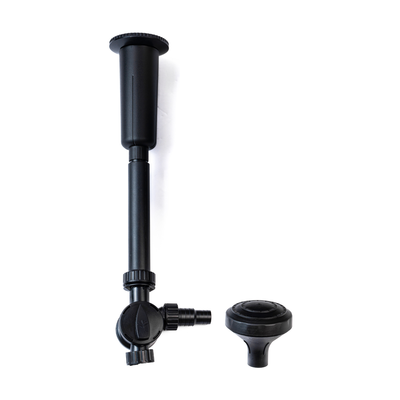
Assembling the fountain set
Screw the outflow onto the connector
Optionally screw on the fountain set with riser pipe
Adjust the height so it comes out above the water surface
Easily switch fountain heads for a different look
The fountain also helps aerate your pond and provides extra oxygen.
3
Connecting a pond hose
If you want to use the outflow for, say, a waterfall or stream, simply connect a pond hose. We recommend using a 25 mm hose; this isn't included but can be ordered separately with the BluFilter. Connect the hose over the hose nozzle and use a hose clamp if needed to hold it firmly in place.
4
Blocking the outflow
If you don't want to use the outflow, unscrew it and use the inspection window to block it off. Always fit the o-ring first to prevent leaks, then place the inspection window into the ring and screw it on, so all the flow goes to, say, the fountain instead of leaking out.
5
Checking the UV-C lamp
Check that the UV-C lamp is working by looking through the transparent inspection window. If the lamp is working properly, you'll see a blue glow. This can be hard to see in daylight, so check again in the dark or at dusk if needed.
6
Placing and testing the BluFilter
Place it on a flat surface in the pond
Make sure the fountain comes out just above the water
Plug it into the socket
Check that the UV-C lamp and fountain are working properly and adjust if needed
7
Doing maintenance
The BluFilter is otherwise fairly low-maintenance. Clean the filter sponges every now and then and make sure to replace the UV-C lamp once a year.
8
Need help?
Want to know exactly how to do this? Check out our maintenance video to find out exactly how to maintain and clean all the parts.
Transcript
(40 lines)
·Click a line to jump there
Frequently asked questions about this video
What hose size should I use for the BluFilter?
We recommend using a 25 mm hose. This isn't included but can easily be ordered separately with the BluFilter.
How do I check if the UV-C lamp is working?
You can check by looking through the transparent inspection window. If the lamp is working properly, you'll see a blue glow; this can be hard to see in daylight, so check in the dark or at dusk instead.
How much maintenance does the BluFilter need?
The BluFilter is fairly low-maintenance. Clean the filter sponges every now and then and replace the UV-C lamp once a year.

 BluFilter 3611
1,620.00 kr
BluFilter 3611
1,620.00 kr